EXHIBIT ENGINEERS · ZIGONG, CHINA
Flight simulator exhibit — physical exhibit reference

Forces & motion

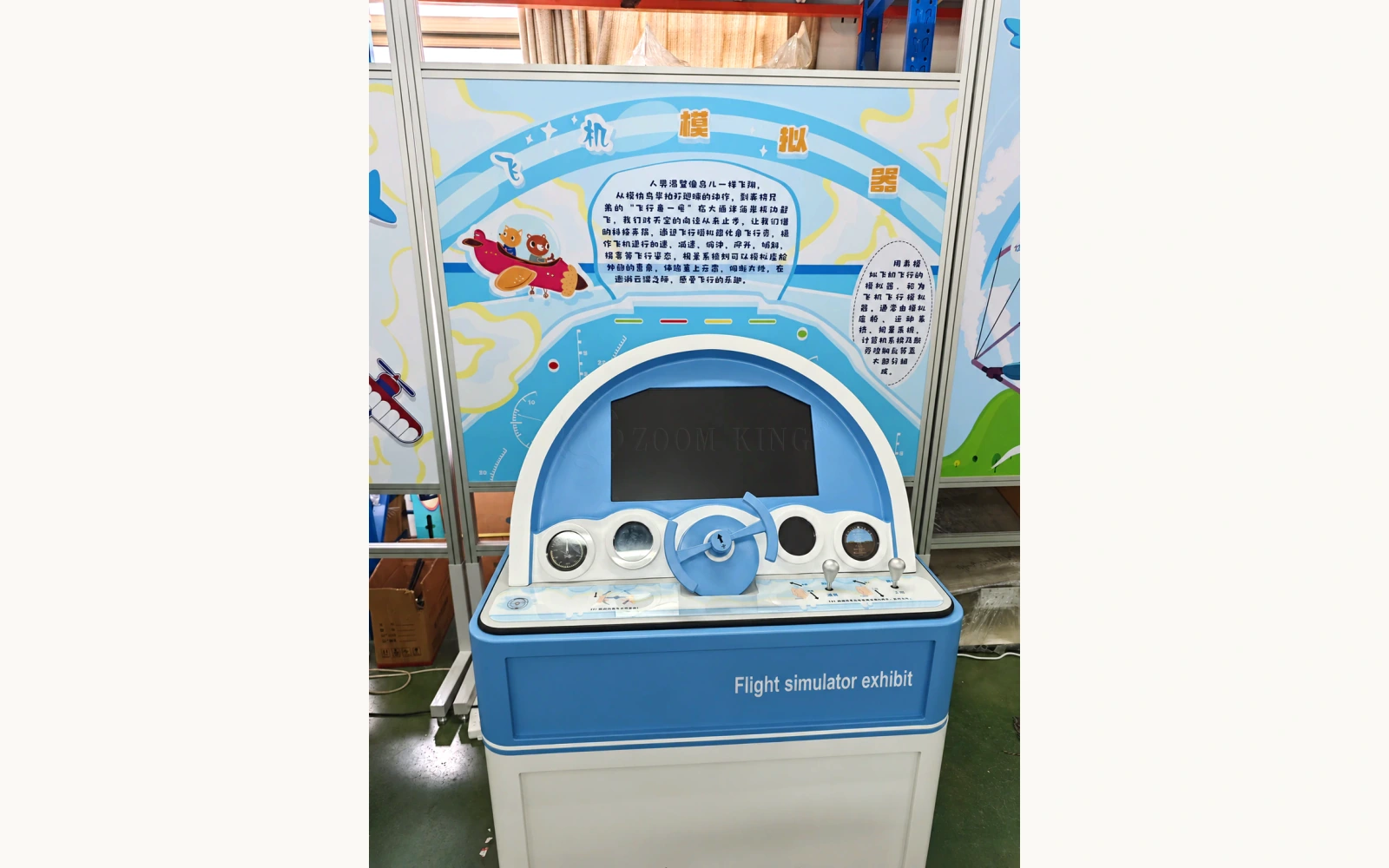
Flight simulator exhibit

Use a physical control yoke and levers to explore how control inputs change the aircraft view on an integrated screen.

▶ Watch the film
18 sec · Real operating video

THE PRODUCT IN MOTION

See it work.

A visitor operates the console's yoke and levers while the integrated screen shows a flight activity over landscape and water.

Video & text guide

THE ACTIVITY & MECHANISM

Connect flight controls with the screen view

The physical yoke and levers provide inputs to flight software. The screen displays the simulated aircraft response, allowing visitors to connect an action at the console with a change in the presented flight. Each input should be interpreted using the supplied software's actual control mapping.

  1. 01

    Find the controls

    Identify the yoke, levers and screen before starting the activity.

  2. 02

    Try a control input

    Move the controls in turn and observe the change on screen.

  3. 03

    Follow the flight

    Use the display to discuss the relationship between an input and the aircraft view.

REFERENCE & PROJECT SCOPE

Reference specifications.

Use the reference dimensions and operating information to plan the exhibit. The agreed project drawings define the supplied configuration, installation interfaces and service access.

L × W × H
980 × 780 × 1,350 mm
Exhibit theme
Forces & motion
Visitor activity
Take the controls. Watch the flight.
Power & supply
Confirm whether this configuration requires power. Powered versions can be specified for 110/220 V AC and 50/60 Hz.
Configuration options
Appearance, interpretation language, controls and installation arrangement by project agreement
Daily operating schedule
8 hours per day
Scheduled maintenance
Every 30 days
Factory dispatch lead time
30–90 calendar days after design approval and receipt of the deposit. Transit time is additional.
Minimum custom order
One exhibit

Reference product dimensions in length × width × height order, including its base or cabinet where present. Allow additional installation and service clearances in the project layout.

Reference configuration notes
Shown arrangement
Standing console with a yoke, two levers and an integrated screen
Visitor action
Operate the physical controls while watching the flight activity
Recording
Workshop operation showing landscape and aircraft-view changes on screen
Customisation, installation & support
01Activity & software
Agree the flight activity, software licence, language, session length and reset method before specifying the screen and computer.
02Control layout
Discuss visitor age, standing or seated access, control reach and the functions assigned to the yoke and levers.
03Daily operation
Plan electrical and ventilation access, screen visibility, startup and shutdown, and replacement access for frequently handled controls.
See the design-to-delivery process

BEFORE AN ENQUIRY

Questions & support.

24 months of complimentary spare-parts support, remote technical guidance and long-term after-sales support. Exhibit Engineers pays the shipping cost of complimentary spare parts during the 24-month support period.

Explore the support
Delivery, installation & after-sales terms
Payment
A 50% deposit is payable after the contract is signed. The remaining balance is paid after acceptance and before dispatch, so full payment is received before dispatch. Payment methods are agreed in the contract.
Packaging & transport
Metal shipping cases or multilayer wood-panel shipping cases. Transport arrangements and costs are agreed to suit the project.
Materials & painted finish
Common material options include Q235 steel, stainless steel, aluminium alloy, PVC, acrylic, engineering plastics. The combination is selected for each configuration. Marine anti-corrosion paint with a piano-gloss automotive paint finish. Applied to painted parts.
Typical power · powered versions
Standard products: 100–500 W; oversized installations: 1,000–5,000 W. Typical ranges for powered versions. Confirm the selected model and final connected load.
Product maintenance
Agree cleaning, control checks and inspection of accessible parts for the supplied configuration.
Installation & training
Complimentary training is available on site or remotely, according to project needs. If installation or on-site after-sales service is not included in the product price, the customer pays the actual travel expenses incurred, unless the contract provides otherwise.
Factory acceptance & handover
Mid-production and pre-dispatch checks are provided. Factory acceptance can take place in person at the factory or through acceptance videos. Installation and operating videos, written installation and operating instructions, drawings and a spare-parts list are provided.
Complimentary parts
24 months of complimentary spare-parts support, starting when the exhibit is handed over for use. Covers faults not caused by the user. User-caused or deliberate damage is excluded. Exhibit Engineers pays the shipping cost of complimentary spare parts during the 24-month support period.
Warranty & repair labour
The whole-exhibit warranty period and repair labour scope and charges are agreed in the contract.
Can we discuss a prototype or sample for a custom version?

Yes. Prototype testing and sample fabrication are available for custom projects. Discuss which functions or features you need to review for your version. The scope, cost and schedule are agreed for the project.

How prototype testing & samples work
Is this suitable for certified pilot training?

The supplied material presents a public interactive exhibit. It does not establish a certified flight-training device; the project brief should focus on the intended school or museum activity.

Can the flight activity and instructions be in English?

English instructions and the screen activity can be included in the project discussion. Confirm the software, its language support and the required control functions together.

What do the images and videos show?

The gallery labels photographs, video frames, renderings and the dimension drawing. Physical footage is identified separately.

FROM CONCEPT TO TURNKEY DELIVERY

Start with a reference. Shape your version.

Share the exhibit name, intended users and a plan or description of your setting. We can work through the experience and practical scope.

START WITH YOUR IDEA

Tell us about your project.

Start with what you have: an idea, a sketch, a reference video or a procurement brief.

Review your message before opening WhatsApp. You can attach drawings or reference videos there.

SAVE YOUR PROJECT REFERENCES

Your selected exhibits.

1 · Select2 · Project3 · Verify & download

Save the exhibits you like, then choose up to 20 products for one complimentary PDF. Your saved list stays in this browser.

Start with an exhibit you like.

Choose “Save” on a product card or product page. Return here to prepare your collection.

Browse products ↗
0 / 20 selected

Need more information?

WhatsApp +86 13881436360 ↗[email protected]